
Simple And Safe
TopEngage keeps the experience clear with wallet, task, referral, and order screens made for Android users.
Real screenshots captured from the installed release app on the connected Android device.
The advantages TopEngage gives Android users in one simple APK.
TopEngage keeps the experience clear with wallet, task, referral, and order screens made for Android users.
Use available tasks to earn coins, then keep track of completed activity from inside the app.
Request followers, likes, comments, saves, reposts, and story views through a fast coin-based flow.
Invite friends, use referral rewards, watch for gift opportunities, and keep earning more coins.
How to use TopEngage is easy.
First, download the official APK from InstaIndia and install the latest Android version.
Open the app, choose available tasks, and collect coins directly in your TopEngage wallet.
Use coins for followers, likes, comments, saves, reposts, and Instagram story views.
New to TopEngage? Watch this quick guide before you begin.
Social networks move quickly, and a simple Android app helps users manage growth without wasting time. TopEngage gives users a coin wallet, task area, referral earning, and order tools in a single APK.
Tap Download, install TopEngage on Android, then open the app from the launcher.
On the Tasks screen, use Add Account when needed, then choose the account row you want to work with.
Use Select All for available accounts, choose the task mode such as Random, and press Start to begin earning.
Open Followers, Posts, or Orders from the bottom navigation and choose the growth action you need.
TopEngage is an Android application for users who want an easy way to earn coins and use those coins for social engagement. The app is built around a clean mobile interface with wallet balance, earning options, growth actions, order history, and referrals.
Users can earn coins through available app tasks and referral activity.
Followers, likes, comments, saves, reposts, and story views are available from one app.
The Android screens are simple: wallet, earn coins, growth options, gift area, and more.
The download button always points users to the latest APK build.
Tap Add Account from the Tasks screen. The app opens the real login screen where users can choose web login, direct login, password recovery, or JSON cookie import when available.
From the Tasks home, tap Add Account in the top action card.
Use Log in via Web for the browser flow, or enter username/email/mobile and password for direct login.
Use Forgotten password if access is lost, or Import / Paste JSON Cookies when you already have a valid session export.
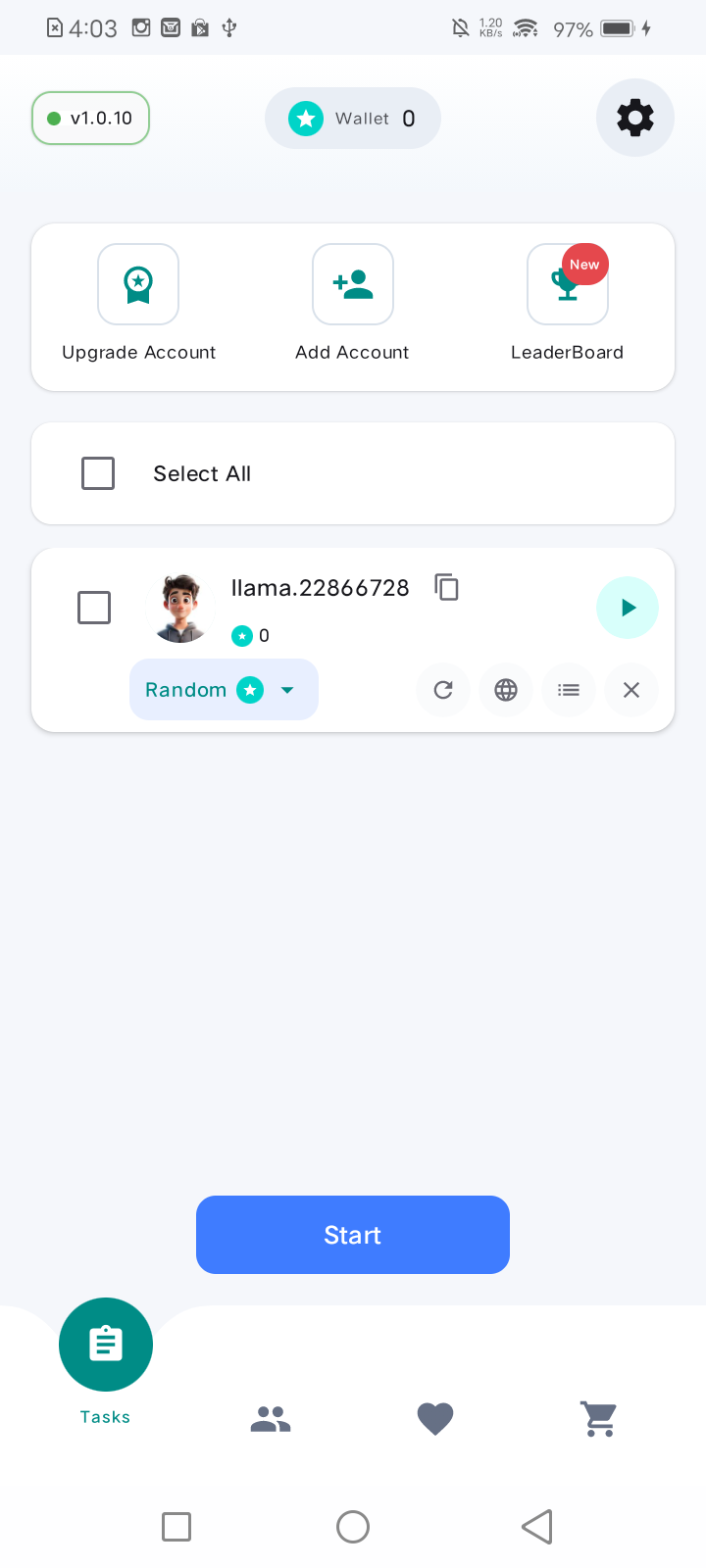
Use the Tasks screen shown on this page. It has the wallet counter at the top, account controls in the first card, selectable account rows in the middle, and the Start button at the bottom.
The wallet pill at the top shows your current coin balance before you start.
Tick Select All or choose one account row. Use the account action icons when you need to refresh, open, view details, or remove a row.
The dropdown on the account row lets you choose how tasks are selected. Random is a simple starting mode.
Tap the blue Start button. Keep the app open while tasks run, then recheck the wallet balance.
Followers and post services need a target. The target dialog lets users enter the username or paste a post link so the app knows where to send the requested activity.
Open Followers or Posts, then tap Select Target at the top of the screen.
For profile growth, type the Instagram username. For post services, paste the public post link.
Tap OK so TopEngage can load the target before you choose a package or quantity.
Use the bottom navigation to open Followers, Posts, or Orders. Each screen shows what target information is required before a growth order can be placed.
Tap Followers, choose Select Target, then pick a package such as 100, 200, 400, 500, 1000, or 2000 followers.
Tap Posts when you need likes or comments. Select a target or paste a post link so the app can load the post details.
Tap Orders, choose the activity type, enter the Instagram username or link, then select or type the quantity.
Make sure the target is public when required, confirm the quantity is within range, and keep enough coins in the wallet.
Order History and Settings help users understand what has already happened and keep the app ready for long-running task work.
Go to Orders and switch from Make Order to Order History to review submitted orders and their status.
Tap the gear icon to see account, device information, referral, background access, and app control options.
Use Background Access / Battery so tasks can continue smoothly when the screen is off.
Answers for users before they download the Android APK.
Yes. TopEngage is distributed as an Android APK through the official download button.
Users earn coins by completing available tasks and by using referral rewards.
Coins can be used for followers, likes, comments, saves, reposts, and story views.
The download buttons point to the latest TopEngage APK endpoint.